

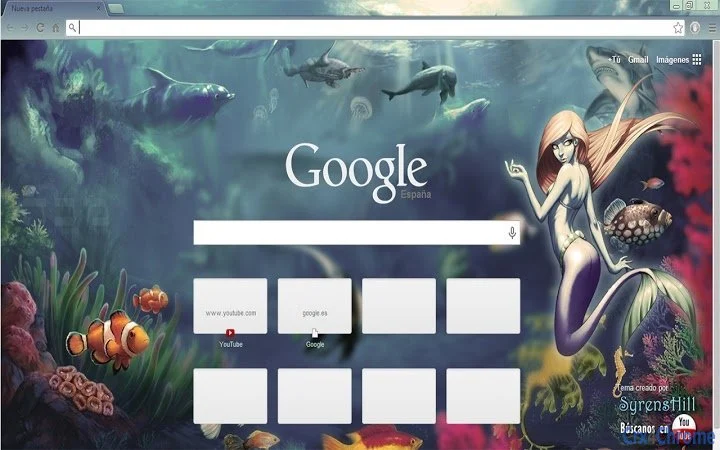
Description
Elegant Marine Browser Theme
Overview
The software is a browser theme designed to transform the visual appearance of web browsers with a serene marine aesthetic. Featuring soft blue tones and a refined design, it appeals to users who appreciate underwater themes and aquatic visuals. The theme is tailored for individuals with an affinity for the ocean, sea creatures, and mythical elements such as sirens. It serves as a simple yet effective way to personalize browsing environments, enhancing visual comfort and user satisfaction. The theme does not alter browser functionality but focuses solely on appearance. It is intended for general users seeking aesthetic customization without performance trade-offs. Real-world usage scenarios include daily browsing, long online sessions, or creative workspaces where visual ambiance matters. The developer did not provide additional background information. Platform compatibility is confirmed for Windows, Mac, and Linux, indicating broad accessibility across desktop operating systems.
Key Features & Capabilities
- Marine Aesthetic Design – The theme features muted blue hues that evoke calm ocean depths, creating a soothing visual experience during extended browsing sessions.
- Thematic Consistency – All interface elements, including tabs, buttons, and menus, are unified under a cohesive underwater theme, ensuring visual harmony.
- Minimalist Visual Approach – The design avoids clutter, emphasizing clean lines and subtle details that reflect the elegance of marine life.
- Compatibility with Major Browsers – Designed to work across popular browsers, allowing users to apply the theme regardless of their preferred platform.
- Lightweight Installation – At just 2.5 MB, the theme requires minimal storage space and loads quickly without impacting browser performance.
Users can apply the theme to personalize their browsing interface, making it ideal for those who enjoy immersive digital environments. For example, someone working from home might use this theme to create a tranquil workspace inspired by the sea. Similarly, fans of mythology or marine biology could use it to reflect their interests. The theme does not include interactive elements or dynamic effects, focusing instead on static visual enhancement. Its primary purpose is aesthetic customization rather than functional improvement.
User Interface, Workflow & Performance
The user interface of the theme is entirely dependent on the host browser’s interface, meaning it does not introduce new controls or navigation systems. Instead, it modifies the visual style of existing elements such as the address bar, tab strip, and toolbar. Navigation remains unchanged, and users can access all standard browser functions without disruption. The workflow is straightforward: install the theme through the browser’s extension or theme store, select it from the available options, and apply it instantly. No additional configuration is required. Performance observations are based on general software behavior patterns. The developer did not specify resource usage details. However, given the theme’s small file size and non-functional nature, it is expected to have negligible impact on CPU or RAM usage. Stability is assumed to be high, as themes typically do not interfere with core browser operations. No reports of crashes or conflicts were mentioned.
Compatibility & System Requirements
The software is compatible with Windows, Mac, and Linux operating systems. The version is listed as 1.0, indicating a stable initial release. The installation size is 2.5 MB, which is minimal for a desktop application. Exact system requirements were not listed, so users should rely on standard browser compatibility guidelines. The developer did not specify minimum hardware specifications. Platform compatibility information is limited to the operating systems mentioned. Users should ensure their browser supports theme customization, which is standard for modern browsers. No additional dependencies were noted.
Pros and Cons
Pros
- Visually appealing marine design with elegant blue tones
- Lightweight at only 2.5 MB
- Available for Windows, Mac, and Linux
- Simple installation and immediate application
- Free to download and use
Cons
- No interactive or dynamic visual elements
- Does not enhance browser functionality
- Exact system requirements not specified
- Theme customization limited to visual appearance only
- May not suit users preferring bold or vibrant designs
Is this theme compatible with my browser?
The theme is designed to work with major browsers that support custom themes. Compatibility depends on your browser’s version and settings. Ensure your browser is up to date for optimal performance.
Can I use this theme offline?
Yes, once installed, the theme functions entirely offline. No internet connection is required to maintain the visual style.
Is the theme safe to install?
Yes, the theme is a standard browser extension that modifies only the visual appearance. It does not collect data or install additional software.
How often are updates released?
Updates are released as needed. The current version is 1.0, and no information about future updates was provided.
What type of license does this theme have?
The software is distributed as free-to-use, with no restrictions on personal or non-commercial use.
Final Thoughts + CTA
This marine-themed browser customization offers a refined and calming visual experience for users who appreciate subtle elegance and oceanic aesthetics. With its lightweight design and cross-platform availability, it provides a hassle-free way to personalize your browsing environment. While it does not offer functional enhancements, its focus on visual harmony and mood-setting makes it ideal for fans of sirens, marine life, and serene blue tones. The absence of performance overhead and the free access make it a low-risk, high-reward addition to any digital workspace. Whether you're a creative professional, a student, or simply someone who enjoys a peaceful online experience, this theme delivers on its promise. Download Sea Theme for Your Browser now.
Guides & Tutorials for SyrensHill Theme for Chrome
How to install SyrensHill Theme for Chrome
- Click the Preview / Download button above.
- Once redirected, accept the terms and click Install.
- Wait for the SyrensHill Theme for Chrome download to finish on your device.
How to use SyrensHill Theme for Chrome
This software is primarily used for its core features described above. Open the app after installation to explore its capabilities.
User Reviews for SyrensHill Theme for Chrome 0
No reviews found





